
Theme Sliders
Content slider
Section titled “Content slider”To add a content slider, use the Content Slider element in WPBakery Page Builder, or its shortcode. You find the shortcode’s details in the shortcode generator window.
Adding a content slider with WPBakery Page Builder
Section titled “Adding a content slider with WPBakery Page Builder”-
Click Add Element, then select Content Slider.
-
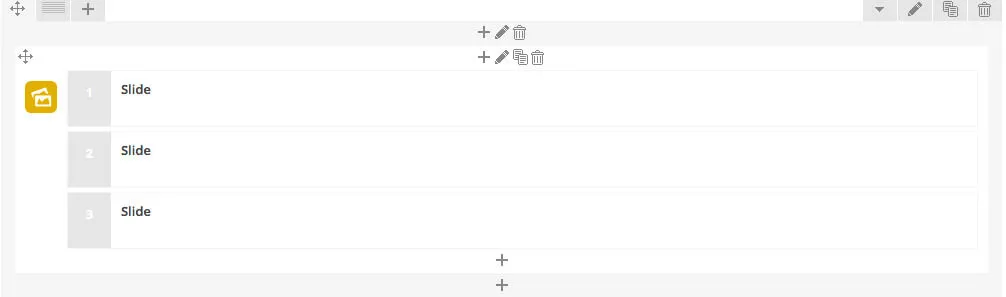
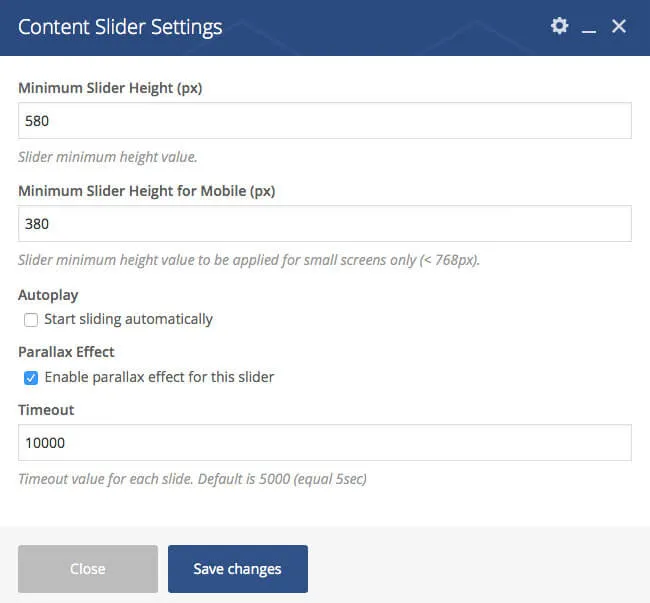
The first element you add is the parent of your slides. Use its settings to set the slider height, the timeout and so on.
-
Add your slides with the + icon inside the parent element.
-
Each slide can have its own style and content.
-
This is one of the demo sliders in WPBakery Page Builder:
Circle slider
Section titled “Circle slider”To add a circle slider, use the Circle Slider element in WPBakery Page Builder, or its shortcode. You find the shortcode’s details in the shortcode generator window.
Adding a circle slider with WPBakery Page Builder
Section titled “Adding a circle slider with WPBakery Page Builder”- Click Add Element, then select Circle Slider.
- In the element settings, select your images from the media library. You can select as many as you like, but at least four, because the slider has four circles to fill.
Slider Revolution
Section titled “Slider Revolution”Slider Revolution is a plugin for building responsive sliders with text, video and image layers. To show a Slider Revolution slider on a page, add a Slider Revolution element and choose the slider you created with the plugin. To learn how to create a slider, see the Slider Revolution documentation.
Demo sliders
Section titled “Demo sliders”We made two demo sliders and included them in the All files and documentation package, which you download from your ThemeForest Downloads page. Import them for a quick start:
- Go to the Slider Revolution screen and click Import Slider.
- Select a demo slider on your computer, in the package’s
Demo Contents/RevSlider/Demo 1(orDemo 2,Demo 3) folder:rt20-demo-main-slider.ziporrt20-demo-main-slider-full-height.zip.
The full demo import is described in Installing the demo content.
Adding a slider to a page
Section titled “Adding a slider to a page”Use the plugin’s shortcode, which you find in the slider’s Slider Settings screen. Or add a Slider Revolution element with WPBakery Page Builder and select your slider.