Miscellaneous
Special class names
Section titled “Special class names”Ava has helper class names that you can enter in any CSS class name field of WPBakery Page Builder, or use in your own HTML.
Alignments
Section titled “Alignments”aligncenter, alignleft and alignright align an element in the centre, on the left or on the right.
Text alignments
Section titled “Text alignments”| Class | What it does |
|---|---|
text-left | Aligns text to the left |
text-center | Centres text |
text-right | Aligns text to the right |
text-justify | Justifies text |
text-nowrap | Keeps text on one line |
Text alignments for small screens
Section titled “Text alignments for small screens”| Class | What it does |
|---|---|
mobile-text-left | Aligns text to the left on small screens |
mobile-text-center | Centres text on small screens |
mobile-text-right | Aligns text to the right on small screens |
Bootstrap class names
Section titled “Bootstrap class names”You can use the Bootstrap 3 responsive utility classes, listed in the Bootstrap 3 documentation. For example, to hide an element only on small devices such as smartphones, add the class hidden-xs.
Typography class names
Section titled “Typography class names”There is a class name for each font you set in Customize › Typography Options. For example, to give a module such as Tabs the same font as your headings, enter heading-font in the module’s CSS class name field.
| Class | Font |
|---|---|
heading-font | Heading font |
body-font | Body font |
secondary-font | Secondary font |
menu-font | Menu font |
sub-menu-font | Sub-menu font |
Creating a one-page design
Section titled “Creating a one-page design”A one-page design takes two steps:
- Create a page whose content rows each have a unique ID.
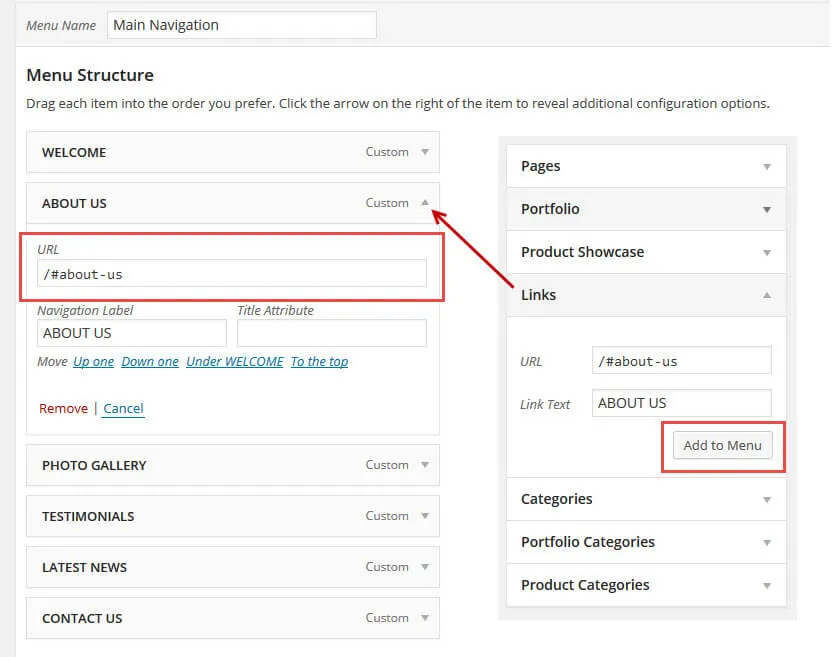
- Create a navigation menu whose links point at those IDs.
Creating the page
Section titled “Creating the page”We recommend WPBakery Page Builder for this, because it makes the page much easier to manage.
-
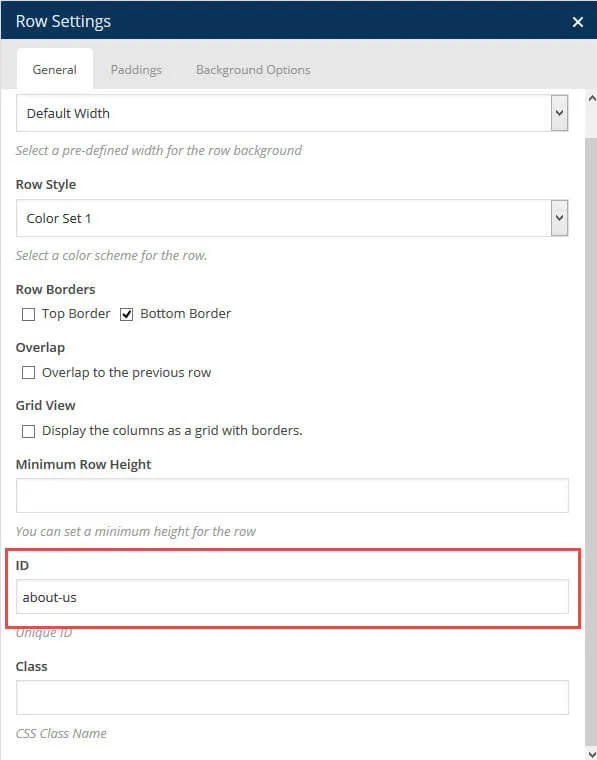
Split your content into several rows. Give every row that the menu should scroll to its own Row ID.
-
Create your menu and add a Custom Links item that points at the row ID.