
Individual Design Options
Overriding the global settings for one page
Section titled “Overriding the global settings for one page”The Customizer sets the look of every page and post on your site. RT-Theme 19 also lets you override these global settings for a single page or post. Each page and post has a Design Options box in the editor, with settings that apply to that page or post only.
Use it when one page needs a completely different look. For example, you can give it its own body background, a different left side or right side background, another background color, or a full-width header.
Every setting starts at Use the global value (or Use the global settings). Leave it there to follow the Customizer. Pick another value to override it for this page only.
The Design Options box
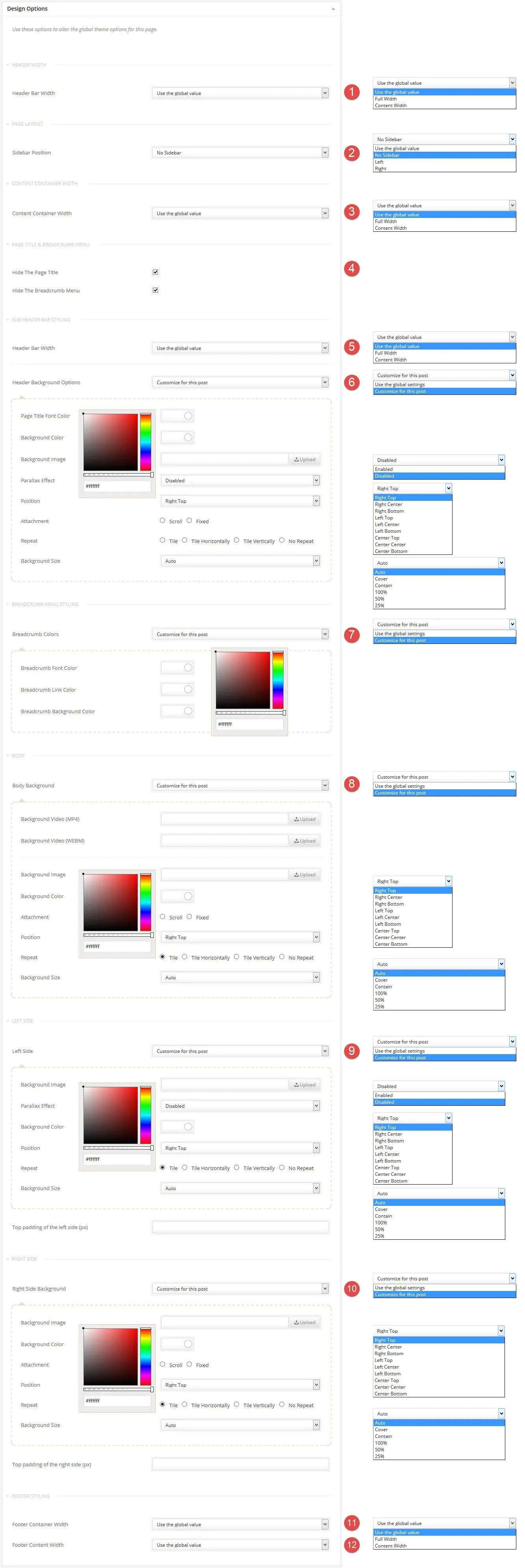
Section titled “The Design Options box”The screenshot below shows every setting in the Design Options box. The numbers match the list under it.
-
Header Bar Width: makes the header full width or content width.
-
Sidebar Position: sets the sidebar to the left, to the right or to no sidebar. The default comes from the Customizer.
-
Content Container Width: makes the content area full width or content width.
-
Hide The Page Title and Hide The Breadcrumb Menu: hide the page title and the breadcrumb menu on this page or post.
-
Header Bar Width under the sub header bar styling: changes the width of the sub header bar, the band with the page title.
-
Header Background Options: sets the page title font color and the background color or image of the sub header bar, with parallax, position, repeat and size.
-
Breadcrumb Colors: sets the font, link and background colors of the breadcrumb menu.
-
Body Background: sets the background color, image or video of the body.
-
Left Side: sets the background color or image of the left side and its top padding.
-
Right Side Background: sets the background color or image of the right side and its top padding.
-
Footer Container Width: makes the footer area full width or content width.
-
Footer Content Width: makes the content inside the footer full width or content width.