
WooCommerce
Creating a WooCommerce shop
Section titled “Creating a WooCommerce shop”RT-Theme 19 works with WooCommerce, the free shop plugin for WordPress. Install WooCommerce when you want a real online shop on your site: products with stock management, sales and coupons, customer accounts and payment gateways. The theme does not need it for anything else.
Installing WooCommerce
Section titled “Installing WooCommerce”WooCommerce is free and is not bundled with the theme. Install it from wordpress.org:
- Go to Plugins › Add New Plugin.
- Search for WooCommerce.
- Click Install Now, then Activate.
- Follow the WooCommerce setup steps to create the shop pages and set your currency, shipping and payments.
You can also download the plugin from its page on wordpress.org or from the WooCommerce website.
WooCommerce on its own handles a standard online shop well. Depending on what you want to do, you may need one or more extensions, for example for an extra payment gateway or for subscriptions. Free extensions are on wordpress.org. Paid extensions are sold on WooCommerce.com and CodeCanyon.
How WooCommerce works
Section titled “How WooCommerce works”WooCommerce has extensive documentation of its own. Read the WooCommerce documentation to learn how to add products, set up payments and shipping, and manage orders.
To change the layout of the shop or the order of the parts on a product page, follow the WooCommerce documentation and add, remove or adjust its action hooks. Ask questions about that in the WooCommerce support forum.
The theme’s WooCommerce settings
Section titled “The theme’s WooCommerce settings”RT-Theme 19 adds its own options to the WooCommerce panel of the Customizer. Go to Appearance › Customize › WooCommerce. The theme’s options are in two sections:
- Product Listing Pages: the global options for the shop and category pages, such as the layout and the number of products per page.
- Single Product Page: the options for the page of a single product.
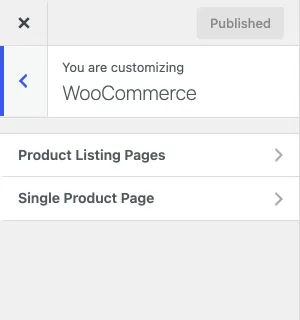
Change the settings, check the preview and click Publish. See WooCommerce options on the Theme Customizer page for every option.
Product Showcase or WooCommerce
Section titled “Product Showcase or WooCommerce”Product Showcase and WooCommerce are completely different systems:
- Product Showcase is the theme’s own product catalog. Use it to present your products in an organized catalog, without online sales.
- WooCommerce is a full shop. Use it when you want to sell your products online through payment gateways.
Moving products from Product Showcase to WooCommerce
Section titled “Moving products from Product Showcase to WooCommerce”You cannot move existing Product Showcase products to WooCommerce. Create the products and categories again as WooCommerce products.
Support
Section titled “Support”WooCommerce has its own support forum and documentation, where you can get free or paid help with how the plugin works. We fix problems that the theme’s code causes, within a reasonable time.
Updating WooCommerce
Section titled “Updating WooCommerce”Before you update WooCommerce, back up your site and check that the new version works with the theme on a staging site. If you need help with theme compatibility, create a support ticket in your dashboard.