
FAQ and Troubleshooting
Short answers to the questions Furnica customers ask most: missing photos, header changes that don’t show, editor surprises, forms, licences and the setup wizard. Each answer links to the page that explains the topic in full. If your question isn’t here, send us the System status report described below.
Before you ask for support
Section titled “Before you ask for support”Go to RT-Themes › Furnica › System status. It checks WordPress, your server and the connections Furnica needs (the licence server, the site’s own REST API, the demo image server). 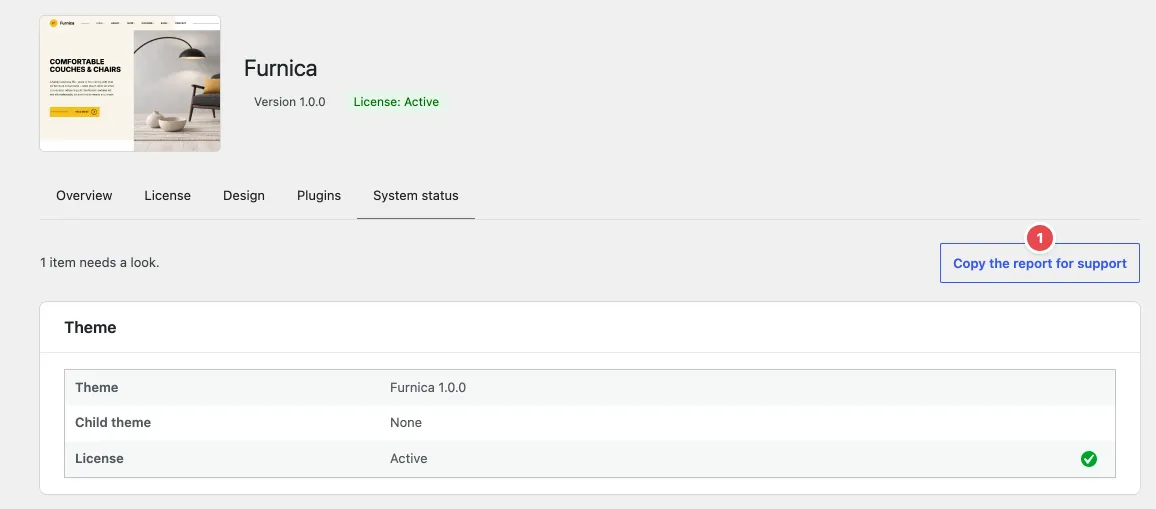
Click Copy the report for support (1) and paste it into your support request in your RT-Themes dashboard: it answers most of our first questions.
Images
Section titled “Images”Why do I see grey boxes instead of photos?
Section titled “Why do I see grey boxes instead of photos?”The theme zip carries no photos. Patterns show light grey placeholders until the setup wizard downloads the demo images. Run RT-Themes › Setup again and, in the Demo content step, pick Demo images. Or replace each image with your own: select it and click Replace.
The demo images didn’t download
Section titled “The demo images didn’t download”Check System status › Connections: the demo image server must be reachable from your server. Some hosts block outgoing requests; ask your host to allow them, then run the setup again. It continues with what is missing.
Header and footer
Section titled “Header and footer”I changed the header width in the Design tab, but nothing changed
Section titled “I changed the header width in the Design tab, but nothing changed”The header bar, footer or page title was edited in the Site Editor, so WordPress uses your saved copy. The Design tab shows a warning under the choice. Click Use the theme’s version to apply the choice (your copy goes to the trash), or change the width in your copy yourself. See Header and Footer.
The menu sits over the text of my page
Section titled “The menu sits over the text of my page”The page uses a template with the header over the hero (“Page, header over the hero” and similar). These are meant for pages that start with a large photo or slider. Pick another template in the page sidebar, for example Pages, or start the page with a Cover block.
How do I change the logo or the menu?
Section titled “How do I change the logo or the menu?”Both are in the Header bar template part, shared by every header: Appearance › Editor › Patterns › Template Parts › General › Header bar. Select the Site Logo block to upload your logo, or the Navigation block to edit the menu.
Editor
Section titled “Editor”A button lost its width
Section titled “A button lost its width”WordPress releases before 7.1.4 drop the Width setting of buttons. Update WordPress to 7.1.4 or later.
I changed a template and a theme update didn’t change it
Section titled “I changed a template and a theme update didn’t change it”That’s WordPress’s rule for block themes: a template or template part you saved in the Site Editor keeps your version. Theme updates reach the ones you haven’t edited. To get the new version, reset it (⋮ › Reset), which drops your changes.
A block doesn’t move although it has a Motion effect
Section titled “A block doesn’t move although it has a Motion effect”Visitors who turned on “reduce motion” see blocks still, and some browsers (Firefox) don’t run scroll-driven movements: the block then shows in place. The editor doesn’t follow the scroll either: click Play in the Motion panel, or preview the page. See Motion.
The back of a card doesn’t show on my phone
Section titled “The back of a card doesn’t show on my phone”Cards flip on hover and keyboard focus. Touch screens have no hover, so put what matters on the front.
Contact form messages don’t arrive
Section titled “Contact form messages don’t arrive”The form sends its messages with WordPress’s email function, which many hosts don’t deliver reliably. Install an SMTP plugin (for example WP Mail SMTP or FluentSMTP) and connect it to your email provider. Also check the Send messages to address in the form’s block settings, and your spam folder.
My newsletter form doesn’t add subscribers
Section titled “My newsletter form doesn’t add subscribers”Check the Form action URL and the Email field name in the block settings against your email service’s embedded form. Some services also need a consent field; see Custom Blocks.
Licence and updates
Section titled “Licence and updates”My licence key is “Not valid”
Section titled “My licence key is “Not valid””Copy the key again from your RT-Themes dashboard, without spaces. A key that is active on another site must be deactivated there first (RT-Themes › Furnica › License › Deactivate on this site), or you manage your sites in your RT-Themes dashboard.
I don’t see a new version
Section titled “I don’t see a new version”Theme updates need an active licence. Open RT-Themes › Furnica › License and click Check now, then look in Dashboard › Updates.
Setup wizard
Section titled “Setup wizard”A step failed during the install
Section titled “A step failed during the install”Open Details on the Install step to see which one. Run the setup again: nothing is installed twice and it continues with what is missing. If the same step fails again, copy the System status report for support.
Can I remove the demo content later?
Section titled “Can I remove the demo content later?”Yes. Open RT-Themes › Setup and click Remove what the wizard installed. It deletes the pages, demo items and images the wizard created; what you edited since is kept.
Languages
Section titled “Languages”Is Furnica translation-ready?
Section titled “Is Furnica translation-ready?”Yes. The theme and both plugins load translations from their languages folders and come with POT files. Translate them with a plugin such as Loco Translate, or on your computer with Poedit.