
Motion
Every block has a Motion panel in its sidebar (from the RT-Themes Blocks plugin). With it a block fades, slides or zooms in as it comes into view. The movement is pure CSS: no script runs on the page, and the stylesheet loads only where a block uses it.
Add a movement
Section titled “Add a movement”- Select the block.
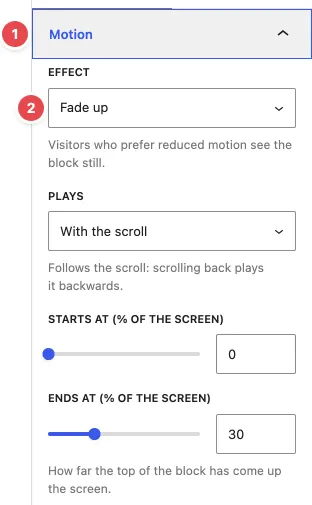
- In the block sidebar, open Motion (1).
- Under Effect (2), pick one: Fade in, Fade up, Fade down, Slide in from the left, Slide in from the right, Zoom in, Zoom out or Parallax.
- Click Play, at the bottom of the panel, to see it in the editor.
- Save.
The editor doesn’t follow the scroll, so the block always stands still there. Play runs the movement once so you can check it. Preview the page to see it move with the scroll.
How it plays
Section titled “How it plays”Plays decides when the movement happens:
- With the scroll (default): the movement follows the scroll. Scrolling back plays it backwards.
- Starts at and Ends at (% of the screen): how far the top of the block has come up the screen when the movement starts and ends.
- Move out when leaving: the block also moves out as it leaves at the top. The range is mirrored, so it ends halfway at most.
- On entering the screen, timed: the movement starts when the top of the block has come up the screen by the start, then plays over its Duration (ms), with a Delay (ms) and Easing.
- Play again on re-entering: off, it plays once per page view.
Parallax always follows the scroll.
Move the inner blocks one after another
Section titled “Move the inner blocks one after another”Turn on One child after another. The inner blocks move instead of the block itself, each a Step later (in % of the screen, or in ms when timed). Use it on a group of cards, a list of features or a row of logos.
Custom movements
Section titled “Custom movements”Pick Custom under Effect to set the movement yourself: Move from X and Move from Y (horizontal and vertical distance), Opacity from, Scale from and Rotate from (deg). The block moves from these values to its normal place.
Good to know
Section titled “Good to know”- Reduced motion: visitors who turned on “reduce motion” in their system see every block still.
- Browsers: movements that follow the scroll run in browsers with CSS scroll-driven animations (Chrome, Edge, Safari). The timed movement needs a recent Chrome or Edge. Elsewhere, for example in Firefox, the block simply shows in place, so nothing is ever hidden.
- A block doesn’t move: if a parent block cuts off its overflow (Overflow: hidden), the movement can’t follow the scroll. Use clip instead of hidden on the parent.
- Keep it light: a few movements on a page draw the eye, a movement on every block tires it.