
Pattern Categories
A pattern is a ready-made group of blocks: a hero slider, a pricing table, a contact section. Insert one and it becomes ordinary blocks on your page, which you edit like any other. Furnica has more than 140 patterns, sorted into the categories below.
Insert a pattern
Section titled “Insert a pattern”-
Open a page or a template in the editor.
-
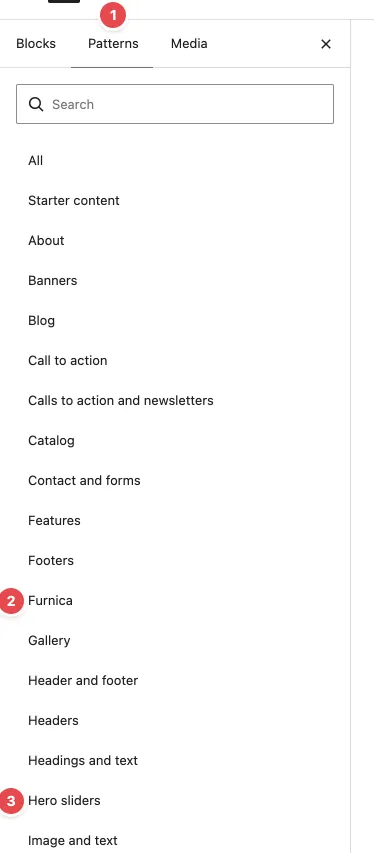
Click + (Block Inserter) at the top left and open the Patterns tab (1).
-
Pick a category, for example Hero sliders (3). The Furnica category (2) holds every Furnica pattern; the other categories also list WordPress’s and WooCommerce’s patterns.
-
Click a pattern to insert it where your cursor is, or drag it into place.
-
Replace the texts and images.
You can also type / and the pattern’s name in an empty paragraph, or search in the inserter.
Patterns you insert are copies: changing the pattern later, or a theme update, doesn’t change the blocks on your page.
The categories
Section titled “The categories”| Category | What’s in it |
|---|---|
| Pages | Full page layouts: the home pages and inner pages. Use them when you create a page, see Templates and Pages. |
| Hero sliders | Hero sliders and intro bands for the top of a page |
| Page titles | Title bands with breadcrumbs, used by the page templates |
| Features | Feature grids, icon lists and numbered benefits |
| Image and text | Photos beside text, collections and product showcases |
| Video and images | Video, before and after images, and image hotspots |
| Headings and text | Section headings, accordions, tabs, FAQs and timelines |
| Testimonials | Customer reviews |
| Team | Team members |
| Pricing | Packages and price lists |
| Maps and showrooms | Store maps, maps and showroom addresses |
| Contact and forms | Contact forms and quote requests |
| Calls to action and newsletters | Call to action bands and newsletter sign-ups |
| Shop | Products, categories, cart and checkout (with the Shop feature) |
| Blog | Post lists, carousels and blog sidebars |
| Catalog | Catalog item layouts, cards and archives (with the Catalog feature) |
| Header and footer | Header, footer and menu panels |
The Shop and Catalog patterns appear only when their feature is on in the setup wizard. WooCommerce adds categories of its own next to Furnica’s.
Patterns and photos
Section titled “Patterns and photos”Before the demo images are installed, patterns show light grey placeholders. Click an image block and choose Replace to use your own photo. To get Furnica’s demo photos, run the setup wizard again and pick Demo images in the Demo content step.
Which pattern makes which section?
Section titled “Which pattern makes which section?”Each pattern’s name says what it is, for example “Accordion, boxed” or “Featured posts, metro”. Hover over a pattern in the inserter to see a larger preview. Many patterns come in variants (dark, with a photo, two or three columns): pick the closest one and change its colours or layout in the block settings.