
Footer
Footer contents and options
Section titled “Footer contents and options”The footer of RT-Theme 18 has two parts. The footer area at the top holds your footer widgets in up to five columns. The footer bottom area below it holds the copyright text and the footer menu. You set both up in the WordPress admin: the options under RT-Theme 18 › Footer Options, the widgets under Appearance › Widgets and the menu under Appearance › Menus. Use this page when you want to change what appears at the bottom of every page.
Footer navigation
Section titled “Footer navigation”- Go to Appearance › Menus. Create a menu, or use the default footer menu, and add your menu items. Navigations and the shared guide Creating menus explain the steps.
- Save the menu and assign it to the RT Theme Footer Navigation location.
- Visit your site. If you did everything correctly, the menu appears in the footer.
Footer options and widgets
Section titled “Footer options and widgets”In RT-Theme 18 › Footer Options you set the copyright text in Footer Copyright Text, and the number of widget columns in the footer area, just above the copyright text and the footer menu, in Footer Widget Layout. The copyright text accepts the same HTML as a post. You can also edit it in the Customizer, in the Footer Copyright Text section.
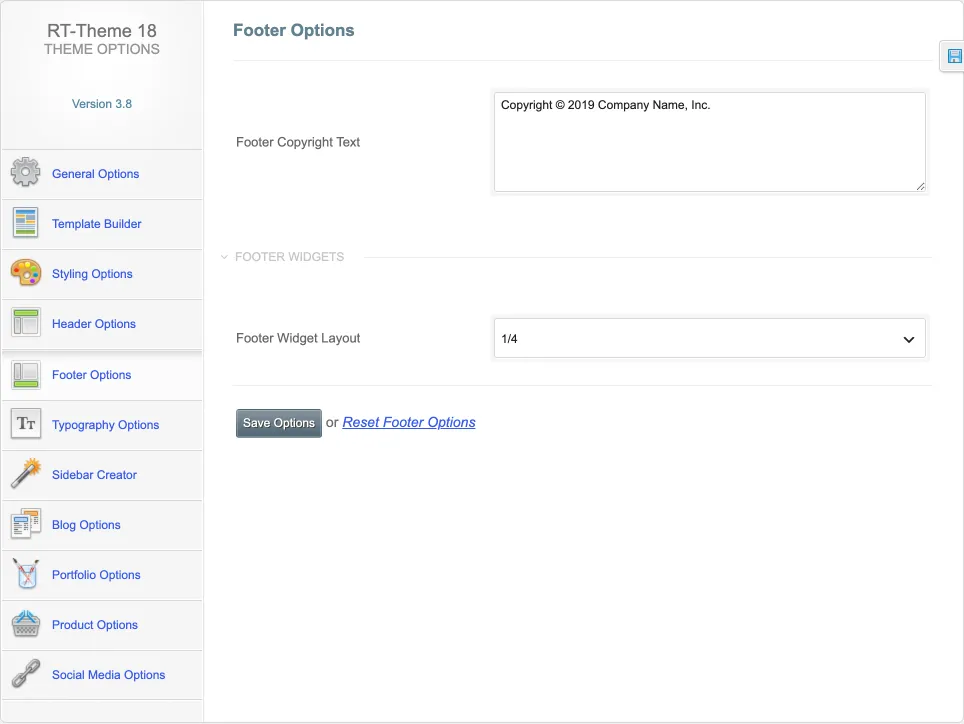
The footer widget areas are Sidebar For Footer (Column 1) to Sidebar For Footer (Column 5) under Appearance › Widgets. Add a widget block to one of them, and it appears in that footer column on your site.