Theme Sliders
Content slider
Section titled “Content slider”NaturaLife gives you two kinds of sliders. The theme’s own content slider shows a few slides with a heading, text and buttons, as on the demo home page. For sliders with animated text, video and image layers, use the bundled Slider Revolution plugin (see below).
To add a content slider, use the NaturaLife Content Slider widget in Elementor, or the shortcode. The shortcode and its parameters are in the Theme Shortcodes generator (see Shortcodes).
Adding a content slider with Elementor
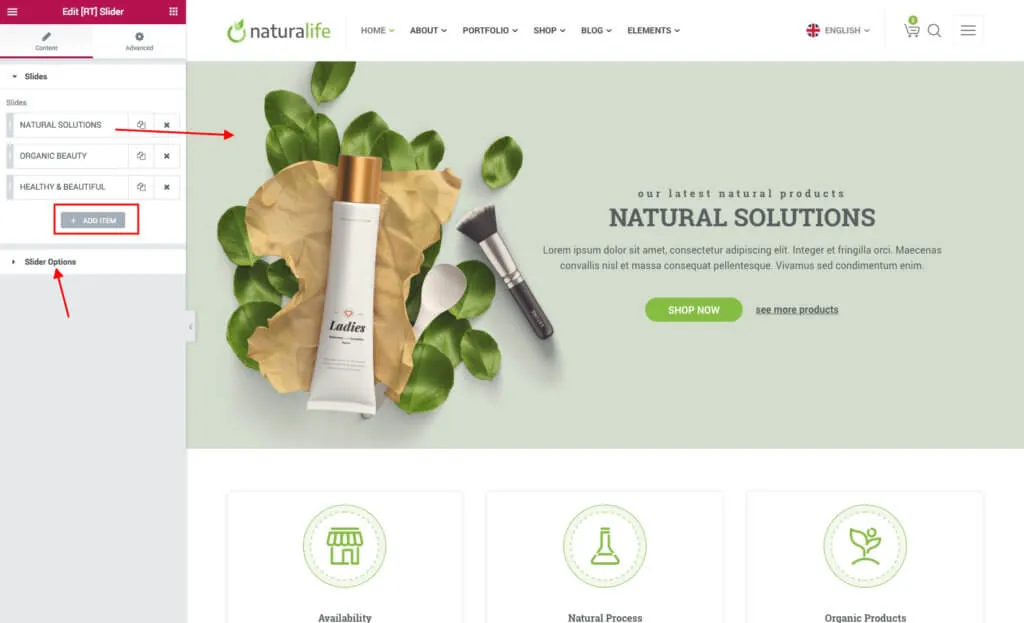
Section titled “Adding a content slider with Elementor”- Edit the page with Elementor and find the slider widget in the widget panel.
- Drag it into the page.
- Add slides with the + ADD ITEM button and set up each one.
- Open Slider Options to change how the slider behaves.
Slider Revolution
Section titled “Slider Revolution”Slider Revolution is a plugin for responsive sliders with text, video and image layers. It comes bundled with NaturaLife, so you do not need a licence of your own for it. You build the sliders in the plugin itself; the Slider Revolution documentation explains how. The demo sliders can be imported with the demo content (see Installing).
Adding a slider to a page with Elementor
Section titled “Adding a slider to a page with Elementor”- Edit the page with Elementor and add the Slider Revolution widget.
- Choose your slider in Choose Slider.
- For a slider across the full width of the page, set the section’s Content Width to Full Width and its Columns Gap to No Gap.